

Appearance
Batch Scraping API
Batch scraping runs the Web Scraping API over a list of URLs you already have, in the background: one POST (or one paste in the dashboard) creates a job, ScrapeIt scrapes every URL with the same settings within your plan's concurrency, and you collect the results per URL or the whole batch in one file. Each URL is billed on its own, and a URL that fails on our side (proxy, browser, timeout) is free.
Batch or crawler?
A batch scrapes exactly the URLs you list. When you do not have the URLs yet and need the pages of a site found for you, use the Website Crawler.
| Batch Scraping | Website Crawler | |
|---|---|---|
| You give it | The list of URLs to scrape: pasted, uploaded as CSV or sent in urls - up to your plan's batch size, at most 50 000 | One or more start pages |
| Pages it scrapes | Exactly the URLs in your list, nothing more | The pages it finds by following links: on the same site, up to maxDepth links away, allowed by your path rules, up to limit pages |
| Settings | Every Web Scraping API parameter, the same for each URL | The crawl rules plus rendering, proxy, extractRules and output formats for every page |
| Results | A result per URL; the whole batch in one JSON, Markdown or text file, and a CSV status table | A result per page; the whole crawl in one JSON, CSV, Markdown or text file |
| Cost | Each URL costs one Web Scraping API request; failures on our side are free | Each page costs one Web Scraping API request; failures on our side are free |
| Use it for | Pages you already know: product URLs you monitor, a sitemap, a list exported from another tool | A site or a section whose page addresses you do not know yet: a blog, a docs site, a catalog |
They work well together: crawl a site once to find its pages, then scrape the ones you care about again with a batch whenever you need fresh data.
Endpoints
| Method & path | Purpose |
|---|---|
POST /api/v1/scrape/batch/web | Create a batch job. |
GET /api/v1/scrape/batch/web/{jobId} | Job status + aggregated counters. |
GET /api/v1/scrape/batch/web/{jobId}/results | Paginated per-item results. |
GET /api/v1/scrape/batch/web/{jobId}/export | Every item in one file: its content or the CSV status table. |
POST /api/v1/scrape/batch/web/{jobId}/stop | Stop a running job. |
Creating a job
The request body is urls plus any Web Scraping API parameters, which apply to every URL in the job (proxyType including auto, proxyCountry, jsRendering, waitUntil, extractRules, …) - except the shared-cache option cache, which batches do not accept (every item is scraped fresh), and the sticky sessionId, which is synchronous-only (parallel items cannot share one exit):
bash
curl -X POST "https://api.scrapeit.io/api/v1/scrape/batch/web" \
  -H "Content-Type: application/json" \
  -H "x-api-key: YOUR_SCRAPEIT_API_KEY" \
  -d '{
    "urls": [
      "https://example.com/products/1",
      "https://example.com/products/2",
      "https://example.com/products/3"
    ],
    "jsRendering": true,
    "proxyType": "datacenter",
    "extractRules": { "title": "h1", "price": ".price" },
    "outputFormat": ["json"]
  }'
js
const response = await fetch('https://api.scrapeit.io/api/v1/scrape/batch/web', {
  method: 'POST',
  headers: {
    'Content-Type': 'application/json',
    'x-api-key': process.env.SCRAPEIT_API_KEY ?? 'YOUR_SCRAPEIT_API_KEY',
  },
  body: JSON.stringify({
    urls: ['https://example.com/products/1', 'https://example.com/products/2'],
    extractRules: { title: 'h1', price: '.price' },
    outputFormat: ['json'],
  }),
});
const { data: batchJob } = await response.json();
console.log(batchJob.id, batchJob.status);
python
import os
import requests

response = requests.post(
    "https://api.scrapeit.io/api/v1/scrape/batch/web",
    json={
        "urls": ["https://example.com/products/1", "https://example.com/products/2"],
        "extractRules": {"title": "h1", "price": ".price"},
        "outputFormat": ["json"],
    },
    headers={"x-api-key": os.environ.get("SCRAPEIT_API_KEY", "YOUR_SCRAPEIT_API_KEY")},
)
batch_job = response.json()["data"]
print(batch_job["id"], batch_job["status"])
The URL count per job is limited by your plan (max_batch_size) and never exceeds 50 000 (400 VALIDATION_ERROR above it, 422 VALIDATION_ERROR above your plan's size). The request body is limited to 25 MiB (413 above it): 50 000 URLs fit when they average about 500 characters - split a list of longer URLs into several jobs. Duplicate URLs are processed as independent items.
Batch scraping is available on plans that include it; on a plan without it, creating a batch returns 403 PLAN_FEATURE_NOT_AVAILABLE with details.feature: "batch_scraping", before any URL is checked or credits are estimated.
Job lifecycle
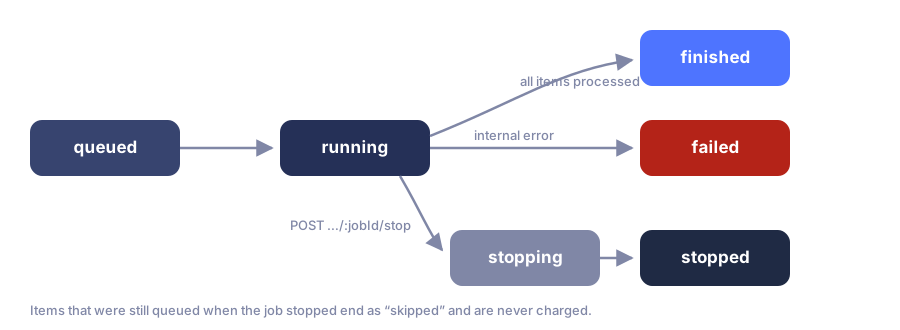
| Status | Meaning |
|---|---|
queued | Accepted, waiting for concurrency slots. |
running | Items are being scraped. |
stopping → stopped | Stop requested → all in-flight items finished, the rest skipped. |
finished | Every item reached a terminal state. |
failed | The job itself failed internally (items keep their own statuses). |
skipped | (items only) The item never ran because the job stopped first. |
Poll GET /api/v1/scrape/batch/web/{jobId} - or better, subscribe to the batch.job.started / batch.job.finished webhooks and skip polling entirely.
Status response
json
{
  "data": {
    "id": "uuid",
    "product_code": "web_scraping_api",
    "status": "running",
    "counters": {
      "total": 1000,
      "processed": 412,
      "billable_success": 391,
      "non_billable_failed": 21,
      "target_errors": 17,
      "proxy_errors": 9,
      "network_errors": 6,
      "browser_errors": 4,
      "internal_errors": 2,
      "skipped": 0,
      "credits_spent": 7820
    },
    "shared_config": { "jsRendering": true, "outputFormat": ["json"] },
    "correlation_id": "uuid",
    "created_at": "2026-07-08T10:00:00.000Z",
    "finished_at": null
  }
}
counters.credits_spent is live: you can watch cost accumulate while the job runs.
Reading results
GET /api/v1/scrape/batch/web/{jobId}/results returns per-item outcomes with standard pagination:
bash
curl "https://api.scrapeit.io/api/v1/scrape/batch/web/BATCH_JOB_ID/results?page=1&per_page=100" \
  -H "x-api-key: YOUR_SCRAPEIT_API_KEY"
Each item mirrors the sync response's billing fields:
json
{
  "id": "uuid",
  "item_index": 0,
  "url": "https://example.com/products/1",
  "status": "finished",
  "scrape_request_id": "uuid",
  "result_metadata": { "…": "sanitized result summary and artifact references" },
  "error_code": null,
  "credits_spent": 30,
  "execution_status": "billable_success",
  "billing_status": "charged",
  "billable_result_category": "target_response_received",
  "non_billable_failure_category": null
}
An item's output is stored as files, referenced from result_metadata:
rawFileId- the page's raw HTML;contentFileId- JSON with everything a synchronous request returns indata.contentbesides the raw page:json(extractRules,extractEmails,extractLinks),text,markdown,networkData,scenarioResults- andhtmlwhenincludeOnlyTags/excludeTags/removeBase64Imagesrewrote it.nullwhen the job asked for the page only;screenshotFileId- the screenshot, whenscreenshotwas requested.
The aiExtractRules answer is inline, in result_metadata.aiExtraction. Download a file with GET /api/v1/files/{fileId}/raw (API key scope files:read): the whole file, streamed, whatever its size or type. Files follow your plan's raw-artifact retention.
Downloading the whole batch
GET /api/v1/scrape/batch/web/{jobId}/export?format=json|markdown|text|csv merges every item into one file, streamed in input order, so you do not collect the content files or page through the results one by one. Add status (finished, failed, skipped or any other item status; all by default) to export only the items in that status. The API key needs the scrape:batch and files:read scopes.
bash
curl "https://api.scrapeit.io/api/v1/scrape/batch/web/BATCH_JOB_ID/export?format=markdown" \
  -H "x-api-key: YOUR_SCRAPEIT_API_KEY" -o batch-results.md

# The URLs that failed, to retry them in a new batch
curl "https://api.scrapeit.io/api/v1/scrape/batch/web/BATCH_JOB_ID/export?format=csv&status=failed" \
  -H "x-api-key: YOUR_SCRAPEIT_API_KEY" -o failed-urls.csv
format | File |
|---|---|
json | An array of items: item_index, url, status, target_http_status, credits_spent, error_code and content - the item's content JSON as above, null when the item has none. |
markdown | The markdown of every item that has it, each under a # <url> heading, separated by ---. |
text | The text of every item that has it, each under a ==> <url> <== line. |
csv | The status table, one row per item without content: item_index, url, status, execution_status, billing_status, credits_spent, target_http_status, error_code, non_billable_failure_category. UTF-8 with a byte order mark, so Excel shows non-Latin URLs right. |
An item without content - failed, still running, past the raw-artifact retention, with a content file storage cannot serve at the moment, or with a content file larger than 16 MiB (download that one by contentFileId) - is content: null in JSON and left out of Markdown and text. In CSV a cell that starts with =, +, - or @ and is not a plain number gets a leading ', so a spreadsheet shows it as text instead of running it as a formula. Every export is recorded in the activity log. The raw HTML of each item stays a file of its own (rawFileId). The batch page in the dashboard offers the same files - saved straight to disk through a one-time link that works once, for a minute - with the CSV of the status chosen in the results filter, plus each item's HTML and JSON.
Each item costs what the same single request costs (request cost).
jsRendering defaults to "auto" here too: each item starts on the fetch and is rendered only when its page needs it (auto rendering). If the balance runs out, the job stops with insufficient_credits.
Stopping a job
bash
curl -X POST "https://api.scrapeit.io/api/v1/scrape/batch/web/BATCH_JOB_ID/stop" \
  -H "x-api-key: YOUR_SCRAPEIT_API_KEY"
In-flight items finish; queued items end as skipped.
Related pages
- Web Scraping API parameters - everything in
shared_config. - Getting job results - polling vs webhooks, paging results, stopping a job.
- Webhooks -
batch.job.started/batch.job.finishedevents. - Billing & credits - credit prices and plans.