

Appearance
Website Crawler API
The Website Crawler collects a whole site, or a section of it, when you do not have the page URLs yet. You give it one or more start pages; it follows the links it finds on the same site and scrapes every page it accepts - as deep as maxDepth, only where includePaths and excludePaths allow, up to limit pages. The results of all pages come together in downloadable JSON, CSV, Markdown and text files.
Crawler or batch?
Both run the Web Scraping API over many pages in the background. The difference is who picks the pages: the crawler finds them by following links, a batch scrapes exactly the list you give it.
| Batch Scraping | Website Crawler | |
|---|---|---|
| You give it | The list of URLs to scrape: pasted, uploaded as CSV or sent in urls - up to your plan's batch size, at most 50 000 | One or more start pages |
| Pages it scrapes | Exactly the URLs in your list, nothing more | The pages it finds by following links: on the same site, up to maxDepth links away, allowed by your path rules, up to limit pages |
| Settings | Every Web Scraping API parameter, the same for each URL | The crawl rules plus rendering, proxy, extractRules and output formats for every page |
| Results | A result per URL; the whole batch in one JSON, Markdown or text file, and a CSV status table | A result per page; the whole crawl in one JSON, CSV, Markdown or text file |
| Cost | Each URL costs one Web Scraping API request; failures on our side are free | Each page costs one Web Scraping API request; failures on our side are free |
| Use it for | Pages you already know: product URLs you monitor, a sitemap, a list exported from another tool | A site or a section whose page addresses you do not know yet: a blog, a docs site, a catalog |
They work well together: crawl a site once to find its pages, then scrape the ones you care about again with a batch whenever you need fresh data.
Endpoints
| Method & path | Purpose | API key scope |
|---|---|---|
POST /api/v1/scrapers/crawler/jobs | Create a crawler job. | scrapers:run |
GET /api/v1/scrapers/jobs/{jobId} | Job status, counters and result files. | scrapers:read |
GET /api/v1/scrapers/jobs/{jobId}/results | Paginated per-page results. | scrapers:read |
DELETE /api/v1/scrapers/jobs/{jobId} | Stop a running crawl. | scrapers:stop |
API key or dashboard
Call these endpoints with an API key (x-api-key) that holds the scope in the table, or from the dashboard (no-code Scrapers section), which uses the same endpoints with your session. See Authentication.
Creating a crawl
bash
curl -X POST "https://api.scrapeit.io/api/v1/scrapers/crawler/jobs" \
  -H "Content-Type: application/json" \
  -H "x-api-key: YOUR_SCRAPEIT_API_KEY" \
  -d '{
    "urls": ["https://example.com/"],
    "maxDepth": 2,
    "limit": 500,
    "includePaths": ["/blog/*"],
    "excludePaths": ["/blog/tag/*"],
    "outputFormat": ["html", "text"],
    "jsRendering": false,
    "proxyType": "datacenter",
    "proxyCountry": "US",
    "extractRules": { "title": "h1" }
  }'
Parameters
| Parameter | Type | Range | Example | Description |
|---|---|---|---|---|
urls | string[] | ≥ 1 | ["https://example.com/"] | Seed URLs that initialize the crawl frontier. |
maxDepth | number | 0 – 10 | 2 | Link depth from the seeds (0 = seeds only). Default 1. |
limit | number | 1 – 10 000 | 500 | Hard cap on processed pages. Default 100. |
includePaths | string[] | - | ["/blog/*"] | Only URLs matching these path patterns are crawled. The start URLs are always crawled; the patterns apply to the links found. |
excludePaths | string[] | - | ["/blog/tag/*"] | URLs matching these patterns are skipped (wins over include). |
outputFormat | string[] | - | ["html", "text"] | Per-page formats: html, text, markdown, json. Default ["json"]. |
jsRendering | boolean | - | false | Render every page in the managed browser (pricier). Off by default: plain HTTP fetch; an empty page still moves to the browser. |
waitFor | string | - | article h1 | CSS selector to await on rendered pages; requires jsRendering: true. |
extractRules | object | - | {"title":"h1"} | CSS extraction map applied to every page. |
proxyType / proxyCountry | string | - | datacenter / US | Proxy class and ISO country for all page requests - same semantics as the Web Scraping API. |
Discovered links are deduplicated, kept same-site, filtered by your path rules and validated against SSRF policy before they enter the frontier. Deduplication ignores the #fragment, utm_* tracking parameters (in any letter case) and the order of query parameters - ?a=1&b=2 and ?b=2&a=1&utm_source=nav count as one page, crawled and billed once - while repeated parameters keep their order. The page is still fetched at the URL the link pointed to.
The crawler does not read or follow robots.txt. Respecting a site's crawling rules and terms - by limiting the crawl with includePaths, excludePaths, maxDepth and limit - is up to you.
The crawler is available on plans that include it; on a plan without it, creating a crawl returns 403 PLAN_FEATURE_NOT_AVAILABLE with details.feature: "crawler", before any URL is checked or credits are estimated.
A request the crawler cannot run - for example extractRules with a non-string value - is rejected up front with 400 VALIDATION_ERROR, the violations listed in details.issues, and no job is created (error codes).
Your workspace can hold up to twice your plan's concurrency in unfinished crawls (queued, running or stopping) - 32 on a plan with 16 concurrent requests. Crawler pages share those concurrent slots, so more crawls would only wait in line; a crawl over the cap is refused at once with 429 CONCURRENCY_LIMIT_EXCEEDED (details.active_crawler_jobs, details.limit) and a Retry-After header. Start it again when one of your crawls finishes.
Lifecycle events (scraper.job.started, scraper.job.finished, scraper.job.failed) go to your organization's webhook endpoints subscribed to them; a crawler job takes no per-job webhook.
Job lifecycle
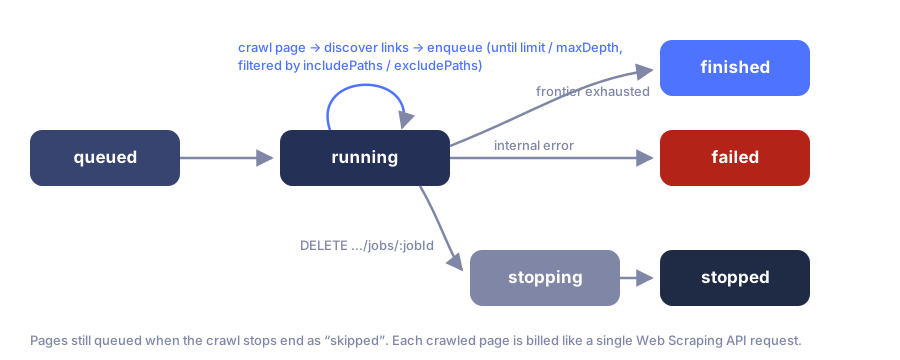
Statuses match batch jobs: queued, running, stopping, stopped, finished, failed, plus skipped for pages still queued when the crawl stopped.
Status response
json
{
  "data": {
    "id": "uuid",
    "product_code": "website_crawler",
    "status": "running",
    "input": { "urls": ["https://example.com/"], "maxDepth": 2, "limit": 500 },
    "counters": {
      "total": 218,
      "processed": 140,
      "billable_success": 133,
      "non_billable_failed": 7,
      "skipped": 0,
      "credits_spent": 133
    },
    "files": [],
    "correlation_id": "uuid",
    "created_at": "2026-07-08T10:00:00.000Z",
    "finished_at": null
  }
}
When the job reaches a terminal state, files lists the aggregated artifacts:
json
"files": [
  { "id": "uuid", "file_id": "uuid", "file_type": "json_results", "created_at": "…" },
  { "id": "uuid", "file_id": "uuid", "file_type": "csv_results", "created_at": "…" },
  { "id": "uuid", "file_id": "uuid", "file_type": "markdown_results", "created_at": "…" },
  { "id": "uuid", "file_id": "uuid", "file_type": "text_results", "created_at": "…" }
]
json_results (every page with its result) and csv_results (the status table) are always there. markdown_results and text_results come when outputFormat asked for markdown or text and at least one page produced it: every page in one file, each under its URL. A page cut to 256 KB ends with a Truncated. note that names its HTML file. A page's HTML stays its own file (htmlFileId, below). Download them by file_id through the Files API; the crawler page in the dashboard saves them directly.
Reading results
Per-page outcomes with standard pagination:
bash
curl "https://api.scrapeit.io/api/v1/scrapers/jobs/CRAWLER_JOB_ID/results?page=1&per_page=100&sort=-createdAt" \
  -H "x-api-key: YOUR_SCRAPEIT_API_KEY"
Each item carries url, crawl depth, status, a sanitized result_payload, its own result_file_id and the same billing fields as every scrape: execution_status, billing_status, billable_result_category, non_billable_failure_category, credits_spent, target_http_status.
What a page result contains
result_payload in /results and every page entry of the crawl's json_results file use camelCase keys. A format you did not request in outputFormat is absent.
| Key | Content |
|---|---|
htmlFileId | Takes the place of html when the page has a stored raw HTML file - every billed page has one, a block page included. It is the id of that file; download it through the Files API (below). |
html | Inline page HTML, at most 256 KB of UTF-8 - only for a page without a stored raw HTML file. |
markdown, text | Inline, each at most 256 KB of UTF-8; truncation never splits a character. |
extract | Your extractRules result, inline, at most 256 KB as JSON. Its shape is kept: long strings are shortened and arrays keep their first elements. |
contentTruncated | Present only when something was cut, and lists only the cut fields, e.g. { "markdown": true }. |
To get the HTML, issue a token with POST /api/v1/files/{htmlFileId}/download-token and download with GET /api/v1/files/{htmlFileId}/download, passing the token in the x-download-token header - see the Files API.
How long the files are kept
A page's HTML file and the crawl's result files are kept for your plan's window (raw_html_retention_hours: 24 hours on Free up to 21 days on Ultra), counted from when each file was made, then deleted automatically. Download what you need to keep; the crawl stays in your job history for 6 months.
Billing
Each crawled page costs what one Web Scraping API request costs. counters.credits_spent totals the job in real time.
Related pages
- Webhooks -
scraper.job.started,scraper.job.finished,scraper.job.failed. - Getting job results - polling vs webhooks, paging results, stopping a job.
- Files & artifacts - downloading the crawl's result files.
- Batch Scraping - when you already know the URL list.
- Apartments.com Scraper API - a structured site scraper when the target is apartments.com rather than an arbitrary site.
- Managed web scraping services - ScrapeIt can run whole-site crawls for you and deliver the data on a schedule.